add-unit1

Saturday, 15 October 2016

Shutdown computer from command

A quick way to shutdown or restart your computer or to schedule a computer shutdown in some time without any external software. Most of you are using a software to schedule a system reboot or shutdown. 
But a geek never relies on any software. Right? :)

Here we go:
Just open your command prompt & play around. :)

1. For Shut Down

shutdown -s

2. For Restarting computer

shutdown -r

3. To Log-off

shutdown -l


-s, -r, -l parameters tells your computer to perform which action from above.

===================

Now what if you want to shutdown your computer at a specified time. No worries :)
we have another trick to do so:

Scheduled Shutdown:

shutdown -s -t 120


That's all for today. Stay tuned for more. :)
Good day guys...

YouTube Tricks

Amazing YouTube Hacks

I am sure most of you don't know these YouTube hacks, but these are amazing actually. :)

1. Type 'Use the force Luke' and watch your YouTube act drunk.


Drunk YouTube :)

2. Downloading Videos from YouTube

Just add a simple 'ss' in the URL after www and before YouTube to download YouTube videos effortlessly. like http://www.ssyoutube.com/watch?v=vZhNv3ThdlI

You will see something like below, download the video quality you want without any external software.


Download any quality you want


3. Watch age restricted videos without logging in.

Came across an age-restricted video? Don't feel like logging in? But still wanna watch it? Because hey, it's age restricted!
Well, worry not. All you have to do is, remove "watch?" from the URL, and replace the "v=" with "v/". Press enter and enjoy the video.

4. Just type 'doge meme' in the search bar to make your YouTube colourful. :)


Love the colors

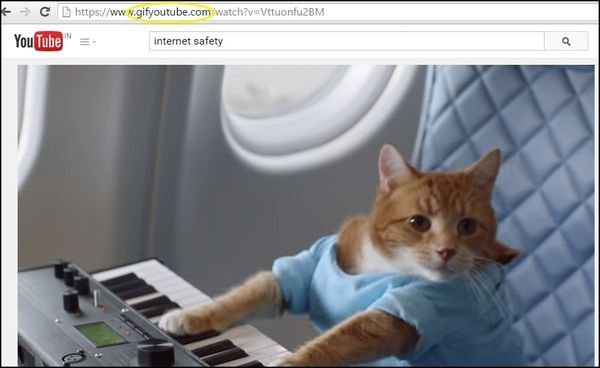
5. Add 'gif' to YouTube in the URL to convert YouTube videos to GIF.

GIF
You'll automatically be taken to a GIF maker where you can choose the length of your GIF.
That's all for now, will be posting more interesting hacks here. Keep visiting for more fun stuff. :)

You know the tricks. You have YouTube. What the hell are you waiting for?

YouTube Tricks

Amazing YouTube Hacks

I am sure most of you don't know these YouTube hacks, but these are amazing actually. :)

1. Type 'Use the force Luke' and watch your YouTube act drunk.


Drunk YouTube :)

2. Downloading Videos from YouTube

Just add a simple 'ss' in the URL after www and before YouTube to download YouTube videos effortlessly. like http://www.ssyoutube.com/watch?v=vZhNv3ThdlI

You will see something like below, download the video quality you want without any external software.


Download any quality you want


3. Watch age restricted videos without logging in.

Came across an age-restricted video? Don't feel like logging in? But still wanna watch it? Because hey, it's age restricted!
Well, worry not. All you have to do is, remove "watch?" from the URL, and replace the "v=" with "v/". Press enter and enjoy the video.

4. Just type 'doge meme' in the search bar to make your YouTube colourful. :)


Love the colors

5. Add 'gif' to YouTube in the URL to convert YouTube videos to GIF.

GIF
You'll automatically be taken to a GIF maker where you can choose the length of your GIF.
That's all for now, will be posting more interesting hacks here. Keep visiting for more fun stuff. :)

You know the tricks. You have YouTube. What the hell are you waiting for?

Friday, 14 October 2016

Change your Login screen on Window 7

Bored from the usual login screen on laptop or PC ? 
Not anymore, I am here with a new trick to change login screen of your system. Just follow these simple steps:


Step 1: Download the registry file from here. Extract the file and double-click on the file to enable this feature (Alternative method: right-click, select Merge).
Step 2: Now, head over to the following folder:
C:\Windows\System32\oobe (“C” is your Windows Seven Installation drive)
Step 3: Here, create a new folder named Info. Again, create a new folder inside the Info folder and rename it as backgrounds.
Step 4: Copy your favorite image file to this folder and rename it as backgroundDefault. Note that the image must be in JPG format and the size should be less than 256 KB.
Step 5: You are done. Reboot your system and see the change.
The following files (sorted by width-to-height ratio) are supported in C:\Windows\System32\oobe\Info\Backgrounds folder:
* backgroundDefault.jpg
* background768×1280.jpg  (0.6)
* background900×1440.jpg  (0.625)
* background960×1280.jpg  (0.75)
* background1024×1280.jpg (0.8)
* background1280×1024.jpg (1.25)
* background1024×768.jpg  (1.33-)
* background1280×960.jpg  (1.33-)
* background1600×1200.jpg (1.33-)
* background1440×900.jpg  (1.6)
* background1920×1200.jpg (1.6)
* background1280×768.jpg  (1.66-)
* background1360×768.jpg  (1.770833-)
And users who prefer to use a third-party instead can check out free tools such as "TweaksLogon" to set your own picture as logon screen background withe a mouse click.

Serial Keys and Licence Keys for most commonly used Softwares

Guys, here are some useful licence keys to make your software full version:

1. Dreamweaver 8 :

    wpd800-57533-91832-61682


2. Advanced SystemCare 5.1.0 Serial Only

    A000D-DEBFE-DDDE2-ACBBB

3. Camtasia Studio 7

    Z5C4A-STKJG-FSGBC-JDMBV-NDBBR

4. CoralDraw Graphics Suite X7

    DE15R36-HKXT49D-T9YN24B-L7YC7LQ

5. Folder Lock 6

    Serial Number: F6-20091120-1-B17754
    Key:   B8F20E949C48707E58D266A25A1ABEC88280FC46BAF2FED618083048DEDAFEFE

    Serial Number: F6-20090324-1-B11250
    Key:   F0C8BEC6EA3E9492945E381CD8323A668E8026E6FEC8BEE6C8321002FE7EBEFE

    Serial: F6-20090324-9-83264
    Key: F0CCFECE123E365A98B0A0EE5E08E074804EEEAAF0CEFEEE12082050DEBEF6FE

6. Power ISO

    Name: Ahmed1337x

    Serial: SQCZA-9UKW9-PI3YU-QTE9W-77UUL
              KVF1S-L3GHZ-AX1FW-I88XQ-WW1MW
              AK337-Y79LV-FUCBN-SJIKR-HG7W9
              U9U38-1IKAE-7SCJF-UXJXP-JIVK9
              NFX3J-FI9D8-YMN8F-JFJNG-BY7C1
              VFAT8-NNGX8-7N35U-1FVST-67D2J
              HUZ26-LMKL6-FIGC7-HK9FQ-VWRRF
              6BMAE-H3PE7-SCHHA-NENEM-54KHJ
              S9A6P-HURIV-JZ4I6-2ZYGJ-RW7ZL
              IM3JI-EGTN5-T19SG-EA835-C2CCN

==============================

      Name: John

      Serial: PCA39-LUT69-9IYUW-7232J-9UCGQ

==============================

      Name: Eric

      Serial: I9N9Y-3EP1T-UFH7S-Z9CPQ-1QWXP

==============================

      Name: Mahodi

      Serial: G8LBJ-FTUG1-3CPMS-2FYYC-1FZJI


7. Power mp3 Cutter Joiner

    user name- IOAP69-hob38YX
    serial- 487747839


8. VMware-workstation-full-9.0.1-894247

    HA2VM-220EP-3ZAN8-JR156-8CNHD
    1V6JV-60H84-LZXV0-028G2-CA2HD
    0V0HD-641E4-FZWK0-UH1EM-CAEP1
    NG25P-AW2DN-RZ1V0-K8252-ACY0P
    1V22N-4LK8H-TZ1N9-GR9Q2-92GK5

9. Xilisoft-video-converter-ultimate7

    Name: smartserials
    Serial: A5B68-6168-645A-474DE370-C571-8C18-A08A
 

10. CoralDraw Graphics Suite X7

    DE15R36-HKXT49D-T9YN24B-L7YC7LQ

Thursday, 13 October 2016

Download videos from YouTube

Hi guys, many of you must be downloading videos from YouTube using an external software. Let me tell you guys, there is no need of any external software & you can download any of the available video quality... :)

Steps to do so:

1. Open any YouTube link.
    For example: https://www.youtube.com/watch?v=vZhNv3ThdlI

2. In the URL bar, just place "ss" in front of YouTube link. Like below:
    http://www.ssyoutube.com/watch?v=vZhNv3ThdlI

3. You will be auto redirected to a different link that will give you the list of video qualities available: (Like below)


Download any quality you want

Note: This will not work if you are using https connection. if so, just change https to http & we are good to go. :)

Enjoy the videos you love in HD quality, without any other external softwares. 

Hope you like this trick. Keep commenting any suggestions/feedbacks & keep sharing the link. 

Deep Web

A world from a hacker's eye.

DEEP WEB
where everything exists, but not visible to naked eyes, stay tuned for more insights of it& bookmark this page. ;)

Beep Codes or Error Codes

You might have heard beep sounds upon system crash/failure, Ever thought what these beeps means? why they are coming in a sequence? if not, then you have come to a right place. :)

I am gonna explain the beep codes, & error codes with the meanings they have.

Standard Original IBM POST Error Codes:
Code Description:

1 short beep System is OK
2 short beeps POST Error - error code shown on screen No beep Power supply or system board problem Continuous beep Power supply, system board, or keyboard problem Repeating short beeps Power supply or system board problem
1 long, 1 short beep System board problem
1 long, 2 short beeps Display adapter problem (MDA, CGA)
1 long, 3 short beeps Display adapter problem (EGA)
3 long beeps 3270 keyboard card
IBM POST Diagnostic Code Descriptions
Code Description
100 - 199 System Board
200 - 299 Memory
300 - 399 Keyboard
400 - 499 Monochrome Display
500 - 599 Colour/Graphics Display
600 - 699 Floppy-disk drive and/or Adapter
700 - 799 Math Coprocessor
900 - 999 Parallel Printer Port
1000 - 1099 Alternate Printer Adapter
1100 - 1299 Asynchronous Communication Device, Adapter, or Port
1300 - 1399 Game Port
1400 - 1499 Colour/Graphics Printer
1500 - 1599 Synchronous Communication Device, Adapter, or Port
1700 - 1799 Hard Drive and/or Adapter
1800 - 1899 Expansion Unit (XT)
2000 - 2199 Bisynchronous Communication Adapter
2400 - 2599 EGA system-board Video (MCA)
3000 - 3199 LAN Adapter
4800 - 4999 Internal Modem
7000 - 7099 Phoenix BIOS Chips
7300 - 7399 3.5" Disk Drive
8900 - 8999 MIDI Adapter
11200 - 11299 SCSI Adapter
21000 - 21099 SCSI Fixed Disk and Controller
21500 - 21599 SCSI CD-ROM System

====================================================

AMI BIOS Beep Codes
Code Description

1 Short Beep System OK
2 Short Beeps Parity error in the first 64 KB of memory
3 Short Beeps Memory failure in the first 64 KB
4 Short Beeps Memory failure in the first 64 KB Operational of memory
or Timer 1 on the motherboard is not functioning
5 Short Beeps The CPU on the motherboard generated an error
6 Short Beeps The keyboard controller may be bad. The BIOS cannot switch to protected mode
7 Short Beeps The CPU generated an exception interrupt
8 Short Beeps The system video adapter is either missing, or its memory is faulty
9 Short Beeps The ROM checksum value does not match the value encoded in the BIOS
10 Short Beeps The shutdown register for CMOS RAM failed
11 Short Beeps The external cache is faulty
1 Long, 3 Short Beeps Memory Problems
1 Long, 8 Short Beeps Video Card Problems

====================================================

Phoenix BIOS Beep Codes
Note - Phoenix BIOS emits three sets of beeps, separated by a brief pause.

Code Description
1-1-3 CMOS read/write failure
1-1-4 ROM BIOS checksum error
1-2-1 Programmable interval timer failure
1-2-2 DMA initialisation failure
1-2-3 DMA page register read/write failure
1-3-1 RAM refresh verification failure
1-3-3 First 64k RAM chip or data line failure
1-3-4 First 64k RAM odd/even logic failure
1-4-1 Address line failure first 64k RAM
1-4-2 Parity failure first 64k RAM
2-_-_ Faulty Memory
3-1-_ Faulty Motherboard
3-2-4 Keyboard controller Test failure
3-3-4 Screen initialisation failure
3-4-1 Screen retrace test failure
3-4-2 Search for video ROM in progress
4-2-1 Timer tick interrupt in progress or failure
4-2-2 Shutdown test in progress or failure
4-2-3 Gate A20 failure
4-2-4 Unexpected interrupt in protected mode
4-3-1 RAM test in progress or failure>ffffh
4-3-2 Faulty Motherboard
4-3-3 Interval timer channel 2 test or failure
4-3-4 Time of Day clock test failure
4-4-1 Serial port test or failure
4-4-2 Parallel port test or failure
4-4-3 Math coprocessor test or failure
Low 1-1-2 System Board select failure
Low 1-1-3 Extended CMOS RAM failure 

regedit hacks

OK Mates, here I am with another coolest trick ever. :)

Any of you that interact more with websites and like to open .html and similar files in notepad to edit scrpits, this is THE coolest windows registry edit ever.

you can easily do it manually

Manually: regedit and navigate to

HKEY_LOCAL_MACHINE\SOFTWARE\Classes\*\Shell

add the key "notepad"

it's default value should be "Open with Notepad"

now, under "notepad", add the key "Command"

it's default value should be (with the quotes) "C:\Windows\System32\Notepad.exe" "%1"

ok, now exit regedit and go right click on ANY file...
your new option: Open with Notepad

HOW BADASS IS THAT?!?!?!?

I FOUND THIS ONE ON MY OWN!!!!!!

I know this one works on XP and 2000, you can PROBABLY enter it manually on windows 9x, but i have not tested that.

I know maybe not everyone cares...but this was fun for me because i love tweaking my computer AND it makes some web design stuff eaiser for me :D

Hide Text in Image without any external software

Geeks should work on command line like a real Ninja. I will show you how to hide a text or any file in image.
This might help you in your secret romance or your secret talks. :)

This trick is called as Steganography. 

STEGANOGRAPHY (LISTEN) IS THE ART AND SCIENCE OF WRITING HIDDEN MESSAGES IN SUCH A WAY THAT NO ONE, APART FROM THE SENDER AND INTENDED RECIPIENT, SUSPECTS THE EXISTENCE OF THE MESSAGE, A FORM OF SECURITY THROUGH OBSCURITY. THE WORD STEGANOGRAPHY IS OF GREEK ORIGIN AND MEANS “CONCEALED WRITING” FROM THE GREEK WORDS STEGANOS (ΣΤΕΓΑΝΌΣ) MEANING “COVERED OR PROTECTED”, AND GRAPHEI (ΓΡΑΦΉ) MEANING “WRITING”.

It doesn’t require you to install any additional softwares.

Requirements :
1. Any Image file.
2. Document that contains your hiding text [ document may be anything E.g.: txt, doc, pdf]
3. Windows Operating System
How to Steps :
1. Place the Image file [Note the image file size] and Document in a folder.
2. Zip the document file.
3. Open Command prompt and navigate to the folder you’re having the image and document zip file.
4. Now type copy /b imagefilename + zipfilename [filename with extensions]
E.g. : copy /b test.jpg + secret.zip
5. Now hit Enter6. You can see the size of the image file will now increased.
7. Now you can send the image alone to anyone and it contains the document inside it.
How to Extract the document in image :1. Open the image with zip tool [E.g.: WinRar]
2. Navigate to the image file location and Click on that image and extract the image.
3. There you can see the document inside it.
4. Extract the document and That’s it.
Hope you have enjoyed this post.
Note : Use this only for educational purpose, don't perform any activities that may put you in trouble.

Amazing YouTube Hacks

I am sure most of you don't know these YouTube hacks, but these are amazing actually. :)

1. Type 'Use the force Luke' and watch your YouTube act drunk.


Drunk YouTube :)

2. Just add a simple 'ss' in the URL after www and before YouTube to download YouTube videos effortlessly. like http://www.ssyoutube.com/watch?v=vZhNv3ThdlI

You will see something like below, download the video quality you want without any external software.


Download any quality you want


3. Watch age restricted videos without logging in.

Came across an age-restricted video? Don't feel like logging in? But still wanna watch it? Because hey, it's age restricted!
Well, worry not. All you have to do is, remove "watch?" from the URL, and replace the "v=" with "v/". Press enter and enjoy the video.

4. Just type 'doge meme' in the search bar to make your YouTube colourful. :)


Love the colors

5. Add 'gif' to YouTube in the URL to convert YouTube videos to GIF.

GIF
You'll automatically be taken to a GIF maker where you can choose the length of your GIF.
That's all for now, will be posting more interesting hacks here. Keep visiting for more fun stuff. :)

You know the tricks. You have YouTube. What the hell are you waiting for?


Wednesday, 12 October 2016

Download videos from YouTube without any software

Hi guys, many of you must be downloading videos from YouTube using an external software. Let me tell you guys, there is no need of any external software & you can download any of the available video quality... :)

Steps to do so:

1. Open any YouTube link.
    For example: https://www.youtube.com/watch?v=vZhNv3ThdlI

2. In the URL bar, just place "ss" in front of YouTube link. Like below:
    http://www.ssyoutube.com/watch?v=vZhNv3ThdlI

3. You will be auto redirected to a different link that will give you the list of video qualities available: (Like below)

Download any quality you want

Note: This will not work if you are using https connection. if so, just change https to http & we are good to go. :)

Enjoy the videos you love in HD quality, without any other external softwares. 

Hope you like this trick. Keep commenting any suggestions/feedbacks & keep sharing the link. 

Command prompt basic commands

Commands that will make your life easier:

Just open the command prompt & play with the commands as per the requirements. :)

  1. Add Hardware Wizard - hdwwiz.cpl
  2.  Add/Remove Programs - appwiz.cpl
  3.  Administrative Tools - control admintools
  4.  Bluetooth Transfer Wizard - fsquirt
  5.  Calculator - calc
  6.  Certificate Manager - certmgr.msc
  7.  Character Map - charmap
  8.  Check Disk Utility - chkdsk
  9.  Clipboard Viewer - clipbrd
  10.  Command Prompt - cmd
  11.  Component Services - dcomcnfg
  12.  Computer Management - compmgmt.msc
  13.  Control Panel - control
  14.  Date and Time Properties - timedate.cpl
  15.  DDE Shares - ddeshare
  16.  Device Manager - devmgmt.msc
  17. Direct X Troubleshooter - dxdiag
  18.  Disk Cleanup Utility - cleanmgr
  19.  Disk Defragment - dfrg.msc
  20.  Disk Management - diskmgmt.msc
  21.  Disk Partition Manager - diskpart
  22.  Display Properties - control desktop
  23.  Display Properties - desk.cpl
  24.  Dr. Watson System Troubleshooting Utility - drwtsn32
  25.  Driver Verifier Utility - verifier
  26.  Event Viewer - eventvwr.msc
  27.  Files and Settings Transfer Tool - migwiz
  28.  File Signature Verification Tool - sigverif
  29.  Findfast - findfast.cpl
  30.  Firefox - firefox
  31.  Folders Properties - control folders
  32.  Fonts - control fonts
  33.  Fonts Folder - fonts
  34.  Free Cell Card Game - freecell
  35.  Game Controllers - joy.cpl
  36.  Group Policy Editor (for xp professional) - gpedit.msc
  37.  Hearts Card Game - mshearts
  38.  Help and Support - helpctr
  39.  HyperTerminal - hypertrm
  40.  Iexpress Wizard - iexpress
  41.  Indexing Service - ciadv.msc
  42.  Internet Connection Wizard - icwconn1
  43.  Internet Explorer - iexplore
  44.  Internet Properties - inetcpl.cpl
  45.  Keyboard Properties - control keyboard
  46.  Local Security Settings - secpol.msc
  47.  Local Users and Groups - lusrmgr.msc
  48.  Logs You Out Of Windows - logoff
  49.  Malicious Software Removal Tool - mrt
  50.  Microsoft Chat - winchat
  51.  Microsoft Movie Maker - moviemk
  52.  Microsoft Paint - mspaint
  53.  Microsoft Syncronization Tool - mobsync
  54.  Minesweeper Game - winmine
  55.  Mouse Properties - control mouse
  56.  Mouse Properties - main.cpl
  57.  Netmeeting - conf
  58.  Network Connections - control netconnections
  59.  Network Connections - ncpa.cpl
  60.  Network Setup Wizard - netsetup.cpl
  61.  Notepad - notepad
  62.  Object Packager - packager
  63.  ODBC Data Source Administrator - odbccp32.cpl
  64.  On Screen Keyboard - osk
  65.  Outlook Express - msimn
  66.  Paint - pbrush
  67.  Password Properties - password.cpl
  68.  Performance Monitor - perfmon.msc
  69.  Performance Monitor - perfmon
  70.  Phone and Modem Options - telephon.cpl
  71.  Phone Dialer - dialer
  72.  Pinball Game - pinball
  73.  Power Configuration - powercfg.cpl
  74.  Printers and Faxes - control printers
  75.  Printers Folder - printers
  76.  Regional Settings - intl.cpl
  77.  Registry Editor - regedit
  78.  Registry Editor - regedit32
  79.  Remote Access Phonebook - rasphone
  80.  Remote Desktop - mstsc
  81.  Removable Storage - ntmsmgr.msc
  82.  Removable Storage Operator Requests - ntmsoprq.msc
  83.  Resultant Set of Policy (for xp professional) - rsop.msc
  84.  Scanners and Cameras - sticpl.cpl
  85.  Scheduled Tasks - control schedtasks
  86.  Security Center - wscui.cpl
  87.  Services - services.msc
  88.  Shared Folders - fsmgmt.msc
  89.  Shuts Down Windows - shutdown
  90.  Sounds and Audio - mmsys.cpl
  91.  Spider Solitare Card Game - spider
  92.  SQL Client Configuration - cliconfg
  93.  System Configuration Editor - sysedit
  94.  System Configuration Utility - msconfig
  95.  System Information - msinfo32
  96.  System Properties - sysdm.cpl
  97.  Task Manager - taskmgr
  98.  TCP Tester - tcptest
  99.  Telnet Client - telnet
  100.  User Account Management - nusrmgr.cpl
  101.  Utility Manager - utilman
  102.  Windows Address Book - wab
  103.  Windows Address Book Import Utility - wabmig
  104.  Windows Explorer - explorer


Thanks for visiting, visit again for more cool stuff, till then keep sharing the link http://techg33ks.blogspot.in. :)