add-unit1

Thursday, 13 October 2016

regedit hacks

OK Mates, here I am with another coolest trick ever. :)

Any of you that interact more with websites and like to open .html and similar files in notepad to edit scrpits, this is THE coolest windows registry edit ever.

you can easily do it manually

Manually: regedit and navigate to

HKEY_LOCAL_MACHINE\SOFTWARE\Classes\*\Shell

add the key "notepad"

it's default value should be "Open with Notepad"

now, under "notepad", add the key "Command"

it's default value should be (with the quotes) "C:\Windows\System32\Notepad.exe" "%1"

ok, now exit regedit and go right click on ANY file...
your new option: Open with Notepad

HOW BADASS IS THAT?!?!?!?

I FOUND THIS ONE ON MY OWN!!!!!!

I know this one works on XP and 2000, you can PROBABLY enter it manually on windows 9x, but i have not tested that.

I know maybe not everyone cares...but this was fun for me because i love tweaking my computer AND it makes some web design stuff eaiser for me :D

Hide Text in Image without any external software

Geeks should work on command line like a real Ninja. I will show you how to hide a text or any file in image.
This might help you in your secret romance or your secret talks. :)

This trick is called as Steganography. 

STEGANOGRAPHY (LISTEN) IS THE ART AND SCIENCE OF WRITING HIDDEN MESSAGES IN SUCH A WAY THAT NO ONE, APART FROM THE SENDER AND INTENDED RECIPIENT, SUSPECTS THE EXISTENCE OF THE MESSAGE, A FORM OF SECURITY THROUGH OBSCURITY. THE WORD STEGANOGRAPHY IS OF GREEK ORIGIN AND MEANS “CONCEALED WRITING” FROM THE GREEK WORDS STEGANOS (ΣΤΕΓΑΝΌΣ) MEANING “COVERED OR PROTECTED”, AND GRAPHEI (ΓΡΑΦΉ) MEANING “WRITING”.

It doesn’t require you to install any additional softwares.

Requirements :
1. Any Image file.
2. Document that contains your hiding text [ document may be anything E.g.: txt, doc, pdf]
3. Windows Operating System
How to Steps :
1. Place the Image file [Note the image file size] and Document in a folder.
2. Zip the document file.
3. Open Command prompt and navigate to the folder you’re having the image and document zip file.
4. Now type copy /b imagefilename + zipfilename [filename with extensions]
E.g. : copy /b test.jpg + secret.zip
5. Now hit Enter6. You can see the size of the image file will now increased.
7. Now you can send the image alone to anyone and it contains the document inside it.
How to Extract the document in image :1. Open the image with zip tool [E.g.: WinRar]
2. Navigate to the image file location and Click on that image and extract the image.
3. There you can see the document inside it.
4. Extract the document and That’s it.
Hope you have enjoyed this post.
Note : Use this only for educational purpose, don't perform any activities that may put you in trouble.

Amazing YouTube Hacks

I am sure most of you don't know these YouTube hacks, but these are amazing actually. :)

1. Type 'Use the force Luke' and watch your YouTube act drunk.


Drunk YouTube :)

2. Just add a simple 'ss' in the URL after www and before YouTube to download YouTube videos effortlessly. like http://www.ssyoutube.com/watch?v=vZhNv3ThdlI

You will see something like below, download the video quality you want without any external software.


Download any quality you want


3. Watch age restricted videos without logging in.

Came across an age-restricted video? Don't feel like logging in? But still wanna watch it? Because hey, it's age restricted!
Well, worry not. All you have to do is, remove "watch?" from the URL, and replace the "v=" with "v/". Press enter and enjoy the video.

4. Just type 'doge meme' in the search bar to make your YouTube colourful. :)


Love the colors

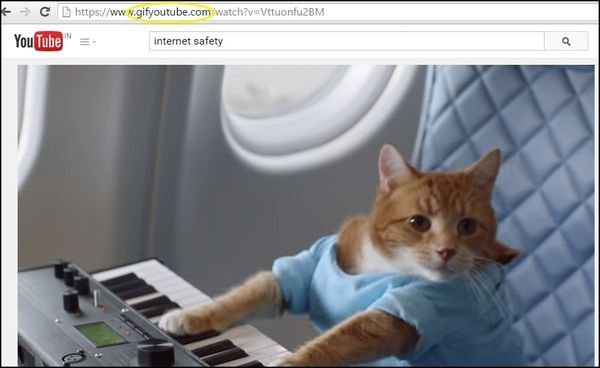
5. Add 'gif' to YouTube in the URL to convert YouTube videos to GIF.

GIF
You'll automatically be taken to a GIF maker where you can choose the length of your GIF.
That's all for now, will be posting more interesting hacks here. Keep visiting for more fun stuff. :)

You know the tricks. You have YouTube. What the hell are you waiting for?


Wednesday, 12 October 2016

Download videos from YouTube without any software

Hi guys, many of you must be downloading videos from YouTube using an external software. Let me tell you guys, there is no need of any external software & you can download any of the available video quality... :)

Steps to do so:

1. Open any YouTube link.
    For example: https://www.youtube.com/watch?v=vZhNv3ThdlI

2. In the URL bar, just place "ss" in front of YouTube link. Like below:
    http://www.ssyoutube.com/watch?v=vZhNv3ThdlI

3. You will be auto redirected to a different link that will give you the list of video qualities available: (Like below)

Download any quality you want

Note: This will not work if you are using https connection. if so, just change https to http & we are good to go. :)

Enjoy the videos you love in HD quality, without any other external softwares. 

Hope you like this trick. Keep commenting any suggestions/feedbacks & keep sharing the link. 

Command prompt basic commands

Commands that will make your life easier:

Just open the command prompt & play with the commands as per the requirements. :)

  1. Add Hardware Wizard - hdwwiz.cpl
  2.  Add/Remove Programs - appwiz.cpl
  3.  Administrative Tools - control admintools
  4.  Bluetooth Transfer Wizard - fsquirt
  5.  Calculator - calc
  6.  Certificate Manager - certmgr.msc
  7.  Character Map - charmap
  8.  Check Disk Utility - chkdsk
  9.  Clipboard Viewer - clipbrd
  10.  Command Prompt - cmd
  11.  Component Services - dcomcnfg
  12.  Computer Management - compmgmt.msc
  13.  Control Panel - control
  14.  Date and Time Properties - timedate.cpl
  15.  DDE Shares - ddeshare
  16.  Device Manager - devmgmt.msc
  17. Direct X Troubleshooter - dxdiag
  18.  Disk Cleanup Utility - cleanmgr
  19.  Disk Defragment - dfrg.msc
  20.  Disk Management - diskmgmt.msc
  21.  Disk Partition Manager - diskpart
  22.  Display Properties - control desktop
  23.  Display Properties - desk.cpl
  24.  Dr. Watson System Troubleshooting Utility - drwtsn32
  25.  Driver Verifier Utility - verifier
  26.  Event Viewer - eventvwr.msc
  27.  Files and Settings Transfer Tool - migwiz
  28.  File Signature Verification Tool - sigverif
  29.  Findfast - findfast.cpl
  30.  Firefox - firefox
  31.  Folders Properties - control folders
  32.  Fonts - control fonts
  33.  Fonts Folder - fonts
  34.  Free Cell Card Game - freecell
  35.  Game Controllers - joy.cpl
  36.  Group Policy Editor (for xp professional) - gpedit.msc
  37.  Hearts Card Game - mshearts
  38.  Help and Support - helpctr
  39.  HyperTerminal - hypertrm
  40.  Iexpress Wizard - iexpress
  41.  Indexing Service - ciadv.msc
  42.  Internet Connection Wizard - icwconn1
  43.  Internet Explorer - iexplore
  44.  Internet Properties - inetcpl.cpl
  45.  Keyboard Properties - control keyboard
  46.  Local Security Settings - secpol.msc
  47.  Local Users and Groups - lusrmgr.msc
  48.  Logs You Out Of Windows - logoff
  49.  Malicious Software Removal Tool - mrt
  50.  Microsoft Chat - winchat
  51.  Microsoft Movie Maker - moviemk
  52.  Microsoft Paint - mspaint
  53.  Microsoft Syncronization Tool - mobsync
  54.  Minesweeper Game - winmine
  55.  Mouse Properties - control mouse
  56.  Mouse Properties - main.cpl
  57.  Netmeeting - conf
  58.  Network Connections - control netconnections
  59.  Network Connections - ncpa.cpl
  60.  Network Setup Wizard - netsetup.cpl
  61.  Notepad - notepad
  62.  Object Packager - packager
  63.  ODBC Data Source Administrator - odbccp32.cpl
  64.  On Screen Keyboard - osk
  65.  Outlook Express - msimn
  66.  Paint - pbrush
  67.  Password Properties - password.cpl
  68.  Performance Monitor - perfmon.msc
  69.  Performance Monitor - perfmon
  70.  Phone and Modem Options - telephon.cpl
  71.  Phone Dialer - dialer
  72.  Pinball Game - pinball
  73.  Power Configuration - powercfg.cpl
  74.  Printers and Faxes - control printers
  75.  Printers Folder - printers
  76.  Regional Settings - intl.cpl
  77.  Registry Editor - regedit
  78.  Registry Editor - regedit32
  79.  Remote Access Phonebook - rasphone
  80.  Remote Desktop - mstsc
  81.  Removable Storage - ntmsmgr.msc
  82.  Removable Storage Operator Requests - ntmsoprq.msc
  83.  Resultant Set of Policy (for xp professional) - rsop.msc
  84.  Scanners and Cameras - sticpl.cpl
  85.  Scheduled Tasks - control schedtasks
  86.  Security Center - wscui.cpl
  87.  Services - services.msc
  88.  Shared Folders - fsmgmt.msc
  89.  Shuts Down Windows - shutdown
  90.  Sounds and Audio - mmsys.cpl
  91.  Spider Solitare Card Game - spider
  92.  SQL Client Configuration - cliconfg
  93.  System Configuration Editor - sysedit
  94.  System Configuration Utility - msconfig
  95.  System Information - msinfo32
  96.  System Properties - sysdm.cpl
  97.  Task Manager - taskmgr
  98.  TCP Tester - tcptest
  99.  Telnet Client - telnet
  100.  User Account Management - nusrmgr.cpl
  101.  Utility Manager - utilman
  102.  Windows Address Book - wab
  103.  Windows Address Book Import Utility - wabmig
  104.  Windows Explorer - explorer


Thanks for visiting, visit again for more cool stuff, till then keep sharing the link http://techg33ks.blogspot.in. :)